

🚀 Introducing Lyzr Cognis (Default Provider)
Lyzr Cognis is the default memory provider for all agents created in Lyzr Studio. It is a state-of-the-art module built specifically for high-stakes, production-grade workloads where understanding the “long-tail” of a conversation is critical.Key Features of Cognis:
- Temporal Awareness: Understands the timing and sequence of interactions for superior historical context.
- Cross-Session Memory: Unlike standard short-term memory, Cognis can remember details about a specific user across different sessions. If a user returns days later, the agent retains knowledge of previous interactions, preferences, and outcomes.
- Matryoshka Embeddings: Utilizes advanced embedding techniques to optimize search accuracy and storage efficiency.
- SOTA Benchmarking: Competes against and outperforms industry leaders across several retrieval and accuracy parameters.
⚙️ Configuring Short-Term Memory
Short-term memory stores recent messages from the current session, ensuring the agent remembers immediate context without users having to repeat themselves.Step 1: Enable Memory and Select Provider
- Locate: In the Create Agent view, find the Memory toggle under Core Features. Toggle it ON.
- Configure: Click the settings icon next to the Memory feature to open the Configure Memory modal.
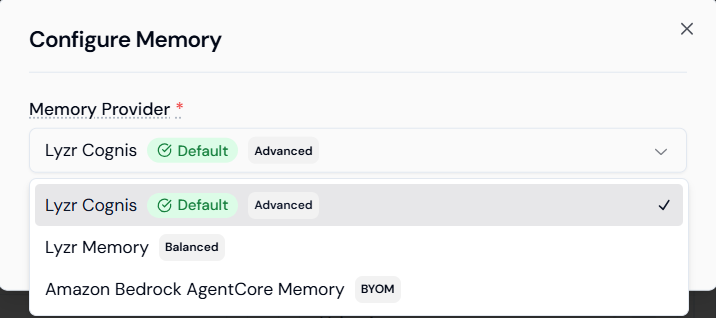
- Select Memory Provider: Choose the desired provider from the updated dropdown menu:
- Lyzr Cognis (Default): The recommended high-performance provider featuring temporal and cross-session awareness.
- Lyzr Memory: A balanced, built-in memory storage option for simpler use cases.
- Amazon Bedrock AgentCore Memory (BYOM): Lyzr supports Bring Your Own Memory (BYOM), allowing you to leverage your own AWS infrastructure.
☁️ AWS External Memory Configuration (BYOM)
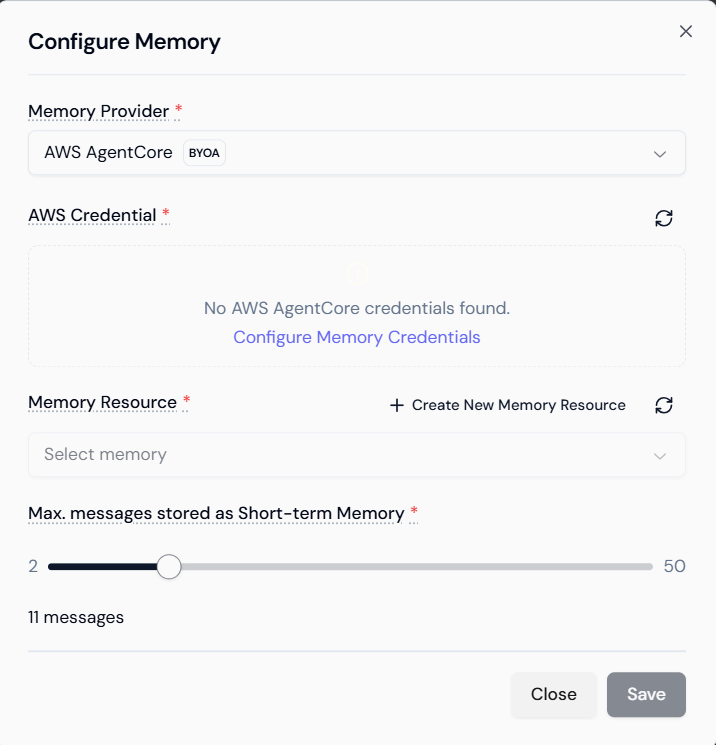
For organizations requiring maximum data control, selecting the Amazon Bedrock AgentCore Memory option allows you to integrate your own cloud environment.- Cloud Integration: Use your own AWS account to store and manage agent memory data.
- Credentials: You must provide the necessary AWS Credentials to enable the BYOM connection.
- Resource Selection: Specify the existing memory resource within your AWS console to house the agent’s conversational data.
🔄 Memory Provider Comparison
| Provider | Type | Core Strengths |
|---|---|---|
| Lyzr Cognis | Advanced | Cross-session persistence, temporal context, and production-scale accuracy. |
| Lyzr Memory | Standard | Balanced performance for simple, single-session interactions. |
| Amazon Bedrock | BYOM | Enterprise-grade privacy; data stays within your private AWS VPC. |
✅ Summary: Memory Behavior
- Coherence: The agent uses recent messages to maintain fluid, natural dialogue.
- User Persistence: With Cognis, memory is no longer session-scoped; the agent builds a profile of the user that persists across multiple calls or chats.
- Flexible Storage: Choose between Lyzr’s optimized SOTA modules or your own enterprise cloud storage for complete data sovereignty.